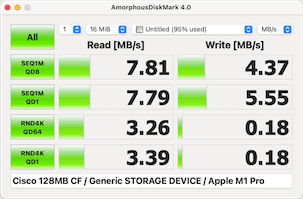
dd benchmarks
💡
Since some cards are too small to use conventional modern benchmark software, here are some numbers using
ddalong with comparable cards for context. The write command isdd if=/dev/random of=/dev/rdisk4 count=8192, and the read command isdd if=/dev/rdisk4 of=/dev/null. Test system us MacOS 12.6 with a “Genesys Logic” USB2.0 CF reader
| Read (KB/Sec) | Write (KB/Sec) | Notes | |
|---|---|---|---|
| PNY 8MB VersaCard P-CF008-PA | 591 | 219 | |
| Lexar 8MB 4x-rated “USB Enabled” (no model number, 2000 model) | 882 | 882 | |
| 32MB Cisco (CCF032JCVS6MC01H) | 832 | 811 | |
| 256MB Sandisk SDCFJ (2004 model) | 774 | 282 | |
| Lexar 64MB 12x-rated “USB Enabled” (P/N: 2175, 2001 model) | 742 | 691 | |
| TwinMOS 128MB Ultra-X 70x-rated | 974 | 1,720 | Yes, 1.7MB/sec, really. I ran this with counts up to 32768 |
PNY 8MB VersaCard P-CF008-PA
See dd benchmarks above.
Lexar 8MB 4x-rated “USB Enabled” (no model number, 2000 model)
See dd benchmarks above.
Lexar 64MB 12x-rated “USB Enabled” (P/N: 2175, 2001 model)
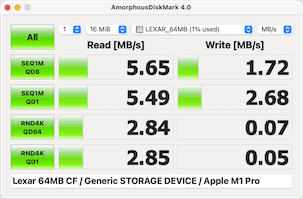
Also see dd benchmarks above.
256MB Sandisk SDCFJ (2004 model)
See dd benchmarks above.
32MB Cisco (CCF032JCVS6MC01H)
See dd benchmarks above.
TwinMOS 128MB Ultra-X 70x-rated
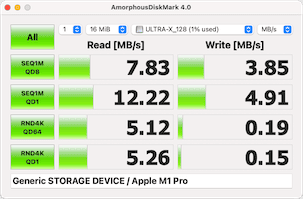
See dd benchmarks above.
Cisco 128MB THNCF128MDGICBD